# Configuring Document References from Objects
Although _Document_ is not an object like _Product_ or _Study_, Vault allows Admins to create special object fields that reference it like an object. When selecting values for these fields, users see documents from the Vault. When users hover over the document name in an object record, Vault displays a preview and information about the document on a document hovercard.
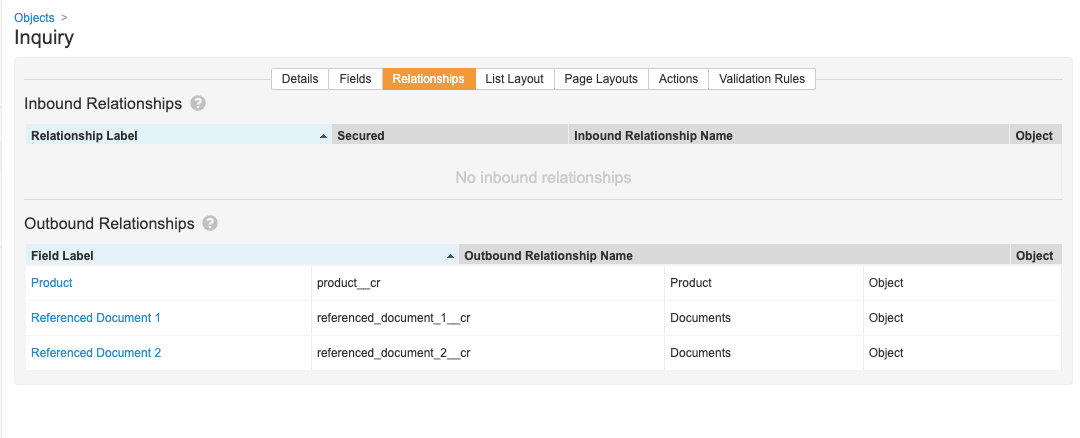
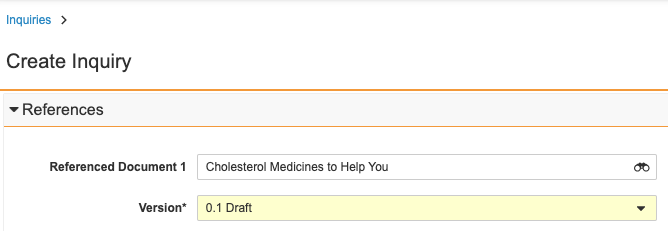 These fields create a relationship between the document and the object. However, the relationship only appears on the object configuration details, not on the document details.
 ## How to Create Document Reference Fields {#create-field}
Most settings for a document reference field are the same as for any other object field. These instructions only cover settings that are specific to document reference fields.
To create a new document reference field on an object:
1. Create a new field within the object's configuration pages.
2. Set the **Field Type** to **Object**.
3. Set the **Object** to **Document**.
4. Set the **Document Version Reference** to **Latest version** (dynamically links to the latest version and updates as new document versions occur), **Latest Steady State version** (dynamically links to the latest steady state version and updates automatically as new versions reach steady state), or **Specific version** (prompts the user to select a specific version and maintains the document link to that version).
You can view the document reference field in the _Details_ section of an object record. An Admin must configure the object page layout to add this field to an appropriate section.
### Required Setting {#required}
Like other fields, you can set a document reference field as required via the **User must always enter a value (required)** setting. How you set this depends on whether the field is version-specific or dynamic:
* **Latest version**: Use the "required" setting for the unbound document field, for example, _Logo (unbound)_.
* **Latest steady state version**: Use the "required" setting for the unbound document field, for example, _Logo (unbound)_.
* **Specific version**: Use the "required" setting for the original document field, for example, _Logo_.
### Unique Setting
You can use a document reference field as one of the "uniqueness" parameters for object records via the **Values must be unique** setting. How you set this depends on whether the field is version-specific or dynamic:
* **Latest version**: Use the "unique" setting for the unbound document field, for example, _Logo (unbound)_.
* **Latest steady state version**: Use the "unique" setting for the unbound document field, for example, _Logo (unbound)_.
* **Specific version**: Use the "unique" setting for the original document field, for example, _Logo_.
## About Document Versioning
When you set up a document reference field, you must specify if the field is version-specific or always points to the latest version or latest steady state version (dynamic). When users select a document in a version-specific field, they must also select a version. If the field is dynamic, they cannot select a version.
The _Latest version_ will allow Vault to dynamically update the field for every new version of the document, regardless of the state.
The _Latest steady state version_ will only dynamically update when a new version reaches steady state. For example, if the most current version of a document is 1.1, the document reference field will continue to show the 1.0 version as the 1.1 version is not in steady state.
## About the Unbound Document Field {#unbound}
When you create a document reference field, Vault automatically creates a second field to link to the un-versioned document. This field has a similar label and name as the created field, with the addition of "unbound." For example, the field _Logo_ - `logo__c` automatically creates the field _Logo (unbound)_ - `logo_unbound__c`.
You can choose whether to make the unbound field visible to users in object record pages and hovercards.
## Reporting on Document Fields {#reporting}
You can use _Document_ fields to create an _Object with Document_ report type. In this report type, the document has an "up" relationship from the primary reporting object. This report type allows users to report on all attributes of a document. See Configuring Report Types for information on setting up this and other report types.
## About Document Deletion {#document-deletion}
In situations where a document is in use within your Vault, you may not be able to delete that document. See Deleting Documents for more information.
### Document Deletion & Relationships
When defining relationships between an object and a document, Admins can also define deletion rules. This setting affects how Vault behaves when you attempt to delete a document that is the referenced "object record" in a reference relationship. The **Deletion Rules** are:
* **Prevent deletion of the related document**: This option prevents you from deleting a document if it is selected as a reference on an object record. For example, you cannot delete a document that is referenced on a _Product_ record.
* **Set field to blank when related document is deleted**: When you delete a document that is referenced by an object record, Vault resets the referencing field to be blank. For example, when deleting a document, the document reference field on all _Product_ records referencing that document becomes blank.
### Setting Deletion Rules
After you [create a document reference field][0], you can edit the field to update deletion rules. By default, Vault creates document reference fields with the **Prevent deletion of the related document** rule. You can update the **Deletion Rules** to **Set field to blank when related document is deleted** for both version-specific and dynamic document reference fields as long as the field is not [required][1].
Note that you can only modify deletion rules on an existing document reference field if there are no object records with a value in the field.
### Setting Reference Constraints
Reference constraints limit the documents available to users in a document reference field's Select Document dialog. You can only add reference constraints after you create and save a document reference field.
## Examples Use Cases
These are some ways that a Vault might employ document reference fields:
* In MedComms, an Admin could set up a user action to **Create an Inquiry** from a document. An incoming question to a call center would prompt an agent (a user in the Vault) to answer the question using documents in the Vault. After answering the question, the agent could create an _Inquiry_ record directly from the document they used. In this situation, the document reference field should be version-specific, so the organization can track which version of a document the agent used to answer a specific inquiry.
* In PromoMats, an Admin could set up a document reference field on the _Product_ object that points to the document with the product logo. In this situation, the document reference field would be dynamic, so that the _Product_ record points to the most recent version of the logo.
## Limitations
Document reference fields do not include all of the same functionality that a normal object reference field on an object would support:
* Lookup fields cannot use the document reference relationship.
* Filters cannot use document reference fields. For example, the _Referenced Document_ field could not be a filter on a custom _Inquiries_ tab.
* Object lifecycle state entry criteria cannot use document reference fields.
* Matching Sharing Rules and Custom Sharing Rules cannot use document reference fields.
* Referenced object filters cannot use document reference fields to limit which object records are available in an object relationship.
[0]: #create-field
[1]: #required
## How to Create Document Reference Fields {#create-field}
Most settings for a document reference field are the same as for any other object field. These instructions only cover settings that are specific to document reference fields.
To create a new document reference field on an object:
1. Create a new field within the object's configuration pages.
2. Set the **Field Type** to **Object**.
3. Set the **Object** to **Document**.
4. Set the **Document Version Reference** to **Latest version** (dynamically links to the latest version and updates as new document versions occur), **Latest Steady State version** (dynamically links to the latest steady state version and updates automatically as new versions reach steady state), or **Specific version** (prompts the user to select a specific version and maintains the document link to that version).
You can view the document reference field in the _Details_ section of an object record. An Admin must configure the object page layout to add this field to an appropriate section.
### Required Setting {#required}
Like other fields, you can set a document reference field as required via the **User must always enter a value (required)** setting. How you set this depends on whether the field is version-specific or dynamic:
* **Latest version**: Use the "required" setting for the unbound document field, for example, _Logo (unbound)_.
* **Latest steady state version**: Use the "required" setting for the unbound document field, for example, _Logo (unbound)_.
* **Specific version**: Use the "required" setting for the original document field, for example, _Logo_.
### Unique Setting
You can use a document reference field as one of the "uniqueness" parameters for object records via the **Values must be unique** setting. How you set this depends on whether the field is version-specific or dynamic:
* **Latest version**: Use the "unique" setting for the unbound document field, for example, _Logo (unbound)_.
* **Latest steady state version**: Use the "unique" setting for the unbound document field, for example, _Logo (unbound)_.
* **Specific version**: Use the "unique" setting for the original document field, for example, _Logo_.
## About Document Versioning
When you set up a document reference field, you must specify if the field is version-specific or always points to the latest version or latest steady state version (dynamic). When users select a document in a version-specific field, they must also select a version. If the field is dynamic, they cannot select a version.
The _Latest version_ will allow Vault to dynamically update the field for every new version of the document, regardless of the state.
The _Latest steady state version_ will only dynamically update when a new version reaches steady state. For example, if the most current version of a document is 1.1, the document reference field will continue to show the 1.0 version as the 1.1 version is not in steady state.
## About the Unbound Document Field {#unbound}
When you create a document reference field, Vault automatically creates a second field to link to the un-versioned document. This field has a similar label and name as the created field, with the addition of "unbound." For example, the field _Logo_ - `logo__c` automatically creates the field _Logo (unbound)_ - `logo_unbound__c`.
You can choose whether to make the unbound field visible to users in object record pages and hovercards.
## Reporting on Document Fields {#reporting}
You can use _Document_ fields to create an _Object with Document_ report type. In this report type, the document has an "up" relationship from the primary reporting object. This report type allows users to report on all attributes of a document. See Configuring Report Types for information on setting up this and other report types.
## About Document Deletion {#document-deletion}
In situations where a document is in use within your Vault, you may not be able to delete that document. See Deleting Documents for more information.
### Document Deletion & Relationships
When defining relationships between an object and a document, Admins can also define deletion rules. This setting affects how Vault behaves when you attempt to delete a document that is the referenced "object record" in a reference relationship. The **Deletion Rules** are:
* **Prevent deletion of the related document**: This option prevents you from deleting a document if it is selected as a reference on an object record. For example, you cannot delete a document that is referenced on a _Product_ record.
* **Set field to blank when related document is deleted**: When you delete a document that is referenced by an object record, Vault resets the referencing field to be blank. For example, when deleting a document, the document reference field on all _Product_ records referencing that document becomes blank.
### Setting Deletion Rules
After you [create a document reference field][0], you can edit the field to update deletion rules. By default, Vault creates document reference fields with the **Prevent deletion of the related document** rule. You can update the **Deletion Rules** to **Set field to blank when related document is deleted** for both version-specific and dynamic document reference fields as long as the field is not [required][1].
Note that you can only modify deletion rules on an existing document reference field if there are no object records with a value in the field.
### Setting Reference Constraints
Reference constraints limit the documents available to users in a document reference field's Select Document dialog. You can only add reference constraints after you create and save a document reference field.
## Examples Use Cases
These are some ways that a Vault might employ document reference fields:
* In MedComms, an Admin could set up a user action to **Create an Inquiry** from a document. An incoming question to a call center would prompt an agent (a user in the Vault) to answer the question using documents in the Vault. After answering the question, the agent could create an _Inquiry_ record directly from the document they used. In this situation, the document reference field should be version-specific, so the organization can track which version of a document the agent used to answer a specific inquiry.
* In PromoMats, an Admin could set up a document reference field on the _Product_ object that points to the document with the product logo. In this situation, the document reference field would be dynamic, so that the _Product_ record points to the most recent version of the logo.
## Limitations
Document reference fields do not include all of the same functionality that a normal object reference field on an object would support:
* Lookup fields cannot use the document reference relationship.
* Filters cannot use document reference fields. For example, the _Referenced Document_ field could not be a filter on a custom _Inquiries_ tab.
* Object lifecycle state entry criteria cannot use document reference fields.
* Matching Sharing Rules and Custom Sharing Rules cannot use document reference fields.
* Referenced object filters cannot use document reference fields to limit which object records are available in an object relationship.
[0]: #create-field
[1]: #required