**Source URL:** https://clinical.veevavault.help/en/gr/659849/index.md

# Clinical Operations Application Licensing

<div class="note-border alert-important">
  <div class="alert alert-important" role="alert">
    <div><i class="far fa-exclamation-circle"></i></div>
    <div class="alert-text">
      <p><strong>Important</strong>: For any questions about your contracted organization’s licenses, any changes to your licensing needs, or any discrepancy about licensing, please reach out to your Veeva Account Partner.</p>
    </div>
  </div>
</div>


You can view your active licenses at the application level by navigating to **Admin > Settings**. The **License Information** section displays _Active Study Sites_ for eTMF, CTMS, Payments, Site Connect, Study Startup, and Disclosures applications. Additionally, it displays any _Archived Study Sites_, _Inactive Study Sites_, and _Investigator Portal Study Sites_ for the eTMF application.

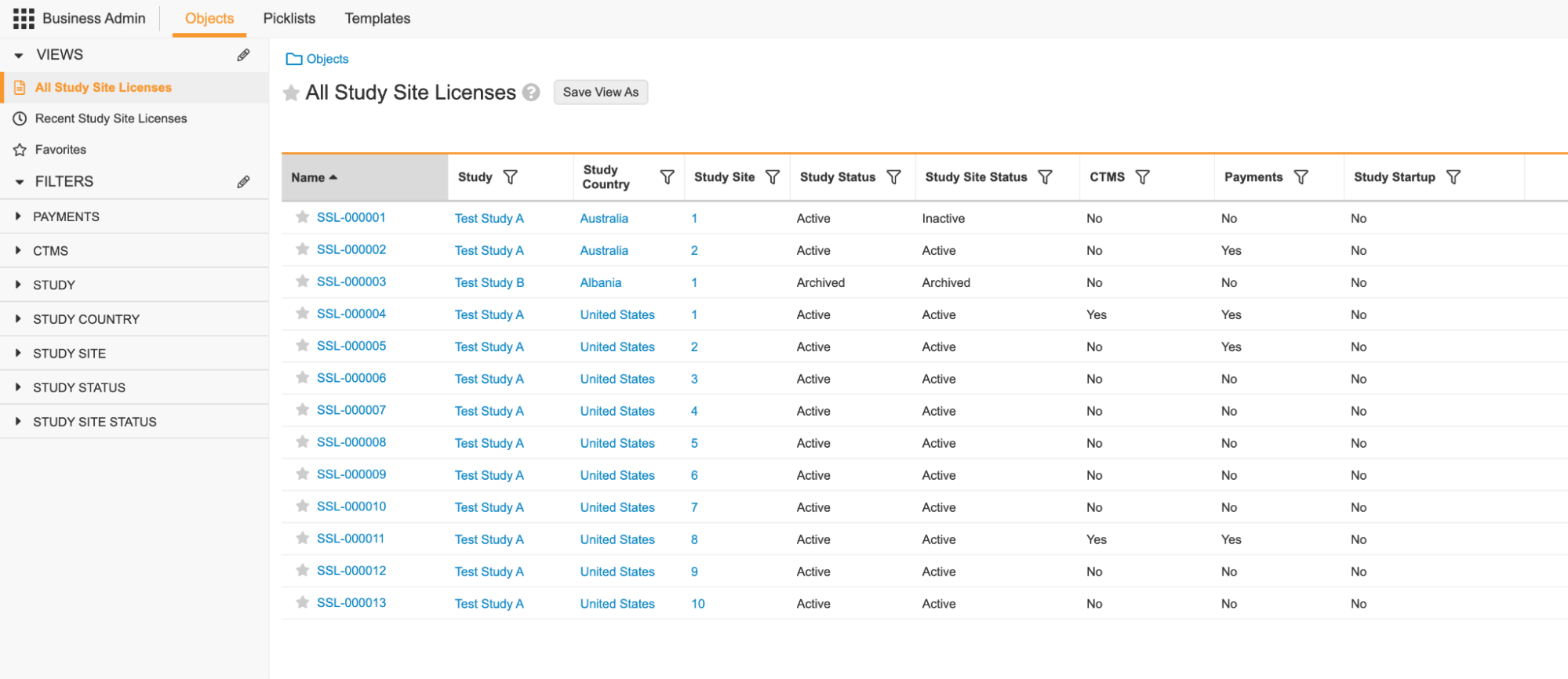
You can also access this information from the _Study Site License_ object. 

<a href="https://platform.veevavault.help/assets/images/clin-ops-app-licensing-01.png" data-lightbox="clin-ops-app-licensing-01.png" data-title="" data-alt="Study Site License object">
  <img class="docimage" src="https://platform.veevavault.help/assets/images/clin-ops-app-licensing-01.png" alt="Study Site License object" style="max-width: 50%;"  />
</a>

Vault updates this information throughout the day. If desired, you can view and report on object records to understand your Vault's license consumption and allow forecasting of license usage. 

If your Vault has exceeded its license limit for any application, it displays a warning message. You must contact your Veeva Account Partner for resolution.
