
Note: If you are unable to locate the answers you need, please see our TMF Bot FAQ .
Note: This article’s contents are specific to TMF Bot and do not apply to RIM Bot, a separate Vault AI feature. Users seeking information for the RIM Bot can reference Evaluating RIM Bot Auto-Classification Models.
| Metric | Definition | What drives this result? | Suggested Target | Example |
| Extraction Coverage | The number of documents that had appropriate information to train the model | Documents that fit our extraction criteria (extractable text) | 50–90%, with the lower end being appropriate for non-English customers | An enterprise customer trained a model on 200,000 of their latest documents; their Extraction coverage was 85.34% |
| Auto-classification Coverage | The number of documents that had a prediction above your Prediction Confidence Threshold | Your Prediction Confidence Threshold, as well as the number and accuracy of documents used for training | 45–95%, with the lower end being appropriate for customers who train with a small number of documents (<5,000) | A customer with a .90 Prediction Confidence Threshold was able to achieve 94% Auto-classification Coverage, whereas the same customer with a .99 Prediction Confidence Threshold had 89.65% Auto-classification Coverage |
| Auto-classification Error Rate | Documents with predictions above your Prediction Confidence Threshold that were incorrectly classified | Your Prediction Confidence Threshold, as well as the number and accuracy of documents used for training | Your target for this will depend on how risk-averse your organization is. Typically, lower is better, but keep in mind:
|
A customer with a .90 Prediction Confidence Threshold had a .58% Auto-classification Error Rate, whereas the same customer with a .99 Prediction Confidence Threshold was able to achieve a .28% Auto-classification Error Rate |
Note: Users cannot edit the Prediction Confidence Threshold for system-trained models.
* **Recall**: Percentage of items within this _Metric Subtype_ that were correctly predicted
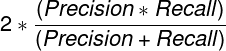
 * **F1-Score**: The balance between _Precision_ and _Recall_
 * **Training Documents**: The number of documents used for training the model. It will be 80% of the total documents used as input. This 80% is randomly selected within each classification.
* **Testing Documents**: The number of documents used for testing the model. This is the remaining 20% of the total documents used as input.
* **Correct Predictions**: The total number of times the model correctly predicted a classification regardless of the prediction confidence.
* **Predictions above Threshold**: The total number of predictions above the _Prediction Confidence Threshold_ selected on this _Trained Model_.
* **Correct Predictions above Threshold**: The total number of correct predictions above the _Prediction Confidence Threshold_ selected on this _Trained Model_.
It is important to note that all predictions marked as correct assume the inputs are classified correctly. Any misclassified documents used to train the model may lead to inaccurate auto-classification. The _Trained Model Artifacts_ listed below can help reveal potential issues.
## _Trained Model Artifacts_
_Trained Models_ have a series of _Trained Model Artifacts_ attached, each containing valuable data. You can find these on a _Trained Model_ object record in the _Trained Model Artifacts_ section. The artifacts include the following files for _Trained Models_ using the _Document Classification_ type:
* **Document Set Extract Results** (documentset_extract_results.csv): Extraction results for each document requested for training this model.
* This file is most helpful in seeing why some documents were not used during the training process.
* You can use the _Document ID_ & _Major/Minor Version_ within this file to view the appropriate document within Vault.
* See Reasons for Extraction Failures below for a list of potential failure reasons.
* **Model Results Confusion Matrix** (model_results_confusion_matrix.csv): Compares the actual classification of documents (the X-axis) to TMF Bot's predicted classification (the Y-axis)
* The diagonal should have the highest numbers, as this is where the true classification and predicted classification intersect.
* Numbers above and below the diagonal indicate confusion. You should investigate classifications with larger numbers of incorrect predictions to understand the reason for the _Trained Model_ confusion.
* **Model Results Document Type Frequency** (model_results_doctype_frequency.csv): Lists all the document types used, the total documents used from each, and the numbers used for training (80%) and testing (20%), respectively. Classifications below the _Minimum Documents per Document Type_ are grouped into OTHERS UNKNOWN.
* **Model Results Individual Predictions** (model_results_individual_predictions.csv): Shows the true document type, encoded document type, top three predictions, and the top three prediction scores for each document, and if the document was misclassified.
* The _True Document Type_ column lists the actual classification from Vault. The _Encoded Document Type_ column shows what you provided to the model: The actual classification or OTHERS UNKNOWN, the latter being for those document types with less than the _Minimum Documents per Document Type_ on the _Trained Model_.
* The file shows three _Prediction Scores_, one for each _Document Type Prediction_. Auto-classification only uses the _First Prediction Score_. If this score is above the _Prediction Confidence Threshold_, that document would have been auto-classified. The second and third scores are for informational purposes only.
* Lastly, _Misclassified_ shows if the _Encoded Document Type_ and the _First Document Type Prediction_ match or not. Filtering to see the _Misclassified_ items can quickly reveal potential issues with your existing documents. For example, if the _Trained Model_ has a _First Prediction Score_ of .9999887 and was misclassified, the document may actually be misclassified in your Vault.
* **Model Results Performance Metrics** (model_results_performance_metrics.csv): A CSV version of the _Model Performance Metrics_ data on this record.
* **Model Results Training Set** (model_results_training_set.csv): Lists the individual documents used for training (the 80% of the entire set of documents) and their classifications. This file can be helpful if you want to review the documents used to train a specific classification, especially if you notice that classification is often misclassified.
### Reasons for Extraction Failures
The **Document Set Extract Results** CSV file gives one of the following reasons for an extraction failure:
* **Language Not Detected**: The system could not detect a language
* **Language Not Supported**: The language detected was not English
* **Not Confident in Language Detection**: The system was not confident in its language detection
* **No Text Available**: The document had no extractable text
* **OCR failed for PDF**: Optical character recognition (OCR) could not complete for a PDF file
* **OCR failed for Complex Image**: OCR could not complete for a complex image format, such a TIFF
* **OCR failed for Simple Image**: OCR could not complete for a simple image format, such as PNG or JPG
* **PDF Rendering failed**: TMF Bot could not render the document as a PDF
* **Current Document Type is Inactive**: The document type for this document is no longer active
* **Steady State not Found**: The document does not have a steady state version
* **This Document Type is Intentionally Excluded**: Document was a binder or in the TMF Document or Final CRF Document type
* **Training Documents**: The number of documents used for training the model. It will be 80% of the total documents used as input. This 80% is randomly selected within each classification.
* **Testing Documents**: The number of documents used for testing the model. This is the remaining 20% of the total documents used as input.
* **Correct Predictions**: The total number of times the model correctly predicted a classification regardless of the prediction confidence.
* **Predictions above Threshold**: The total number of predictions above the _Prediction Confidence Threshold_ selected on this _Trained Model_.
* **Correct Predictions above Threshold**: The total number of correct predictions above the _Prediction Confidence Threshold_ selected on this _Trained Model_.
It is important to note that all predictions marked as correct assume the inputs are classified correctly. Any misclassified documents used to train the model may lead to inaccurate auto-classification. The _Trained Model Artifacts_ listed below can help reveal potential issues.
## _Trained Model Artifacts_
_Trained Models_ have a series of _Trained Model Artifacts_ attached, each containing valuable data. You can find these on a _Trained Model_ object record in the _Trained Model Artifacts_ section. The artifacts include the following files for _Trained Models_ using the _Document Classification_ type:
* **Document Set Extract Results** (documentset_extract_results.csv): Extraction results for each document requested for training this model.
* This file is most helpful in seeing why some documents were not used during the training process.
* You can use the _Document ID_ & _Major/Minor Version_ within this file to view the appropriate document within Vault.
* See Reasons for Extraction Failures below for a list of potential failure reasons.
* **Model Results Confusion Matrix** (model_results_confusion_matrix.csv): Compares the actual classification of documents (the X-axis) to TMF Bot's predicted classification (the Y-axis)
* The diagonal should have the highest numbers, as this is where the true classification and predicted classification intersect.
* Numbers above and below the diagonal indicate confusion. You should investigate classifications with larger numbers of incorrect predictions to understand the reason for the _Trained Model_ confusion.
* **Model Results Document Type Frequency** (model_results_doctype_frequency.csv): Lists all the document types used, the total documents used from each, and the numbers used for training (80%) and testing (20%), respectively. Classifications below the _Minimum Documents per Document Type_ are grouped into OTHERS UNKNOWN.
* **Model Results Individual Predictions** (model_results_individual_predictions.csv): Shows the true document type, encoded document type, top three predictions, and the top three prediction scores for each document, and if the document was misclassified.
* The _True Document Type_ column lists the actual classification from Vault. The _Encoded Document Type_ column shows what you provided to the model: The actual classification or OTHERS UNKNOWN, the latter being for those document types with less than the _Minimum Documents per Document Type_ on the _Trained Model_.
* The file shows three _Prediction Scores_, one for each _Document Type Prediction_. Auto-classification only uses the _First Prediction Score_. If this score is above the _Prediction Confidence Threshold_, that document would have been auto-classified. The second and third scores are for informational purposes only.
* Lastly, _Misclassified_ shows if the _Encoded Document Type_ and the _First Document Type Prediction_ match or not. Filtering to see the _Misclassified_ items can quickly reveal potential issues with your existing documents. For example, if the _Trained Model_ has a _First Prediction Score_ of .9999887 and was misclassified, the document may actually be misclassified in your Vault.
* **Model Results Performance Metrics** (model_results_performance_metrics.csv): A CSV version of the _Model Performance Metrics_ data on this record.
* **Model Results Training Set** (model_results_training_set.csv): Lists the individual documents used for training (the 80% of the entire set of documents) and their classifications. This file can be helpful if you want to review the documents used to train a specific classification, especially if you notice that classification is often misclassified.
### Reasons for Extraction Failures
The **Document Set Extract Results** CSV file gives one of the following reasons for an extraction failure:
* **Language Not Detected**: The system could not detect a language
* **Language Not Supported**: The language detected was not English
* **Not Confident in Language Detection**: The system was not confident in its language detection
* **No Text Available**: The document had no extractable text
* **OCR failed for PDF**: Optical character recognition (OCR) could not complete for a PDF file
* **OCR failed for Complex Image**: OCR could not complete for a complex image format, such a TIFF
* **OCR failed for Simple Image**: OCR could not complete for a simple image format, such as PNG or JPG
* **PDF Rendering failed**: TMF Bot could not render the document as a PDF
* **Current Document Type is Inactive**: The document type for this document is no longer active
* **Steady State not Found**: The document does not have a steady state version
* **This Document Type is Intentionally Excluded**: Document was a binder or in the TMF Document or Final CRF Document type
Note: To enable auto-classification and metadata extraction functionality for documents in languages other than English, contact Veeva Services to enable the Multilingual Model feature.