# Enabling Document Deletion Logs

Regulatory agencies often require companies to maintain records of documents deleted from systems. Vault can store this information using the _Document Deletion_ object. 

## Enabling Document Deletion Logs

To enable document deletion logs:

  1. Navigate to **Admin > Settings > Application Settings**.
  2. Click **Edit**.
  3. Under _eTMF Features_, verify that the <a href="/en/gr/64444/#securing">**Enable Study and Blinding Security on Quality Issues**</a> checkbox is set.
  4. Select the **Disable Document Requiredness on Quality Issues** checkbox.
  5. Select the **Enable Document Deletion Log** checkbox.
  6. Click **Save**.

<div class="note-border alert-info">
  <div class="alert alert-info" role="alert">
    <div><i class="far fa-info-circle"></i></div>
    <div class="alert-text">
      <p><strong>Note</strong>: Once enabled, you cannot disable these settings.</p>
    </div>
  </div>
</div>


You can add the _Delete Document with Reason_ <a href="/en/gr/12339/">user action</a> to any lifecycle state. We recommend adding the user action to the steady state in the applicable lifecycle.

## Viewing Document Deletion Logs

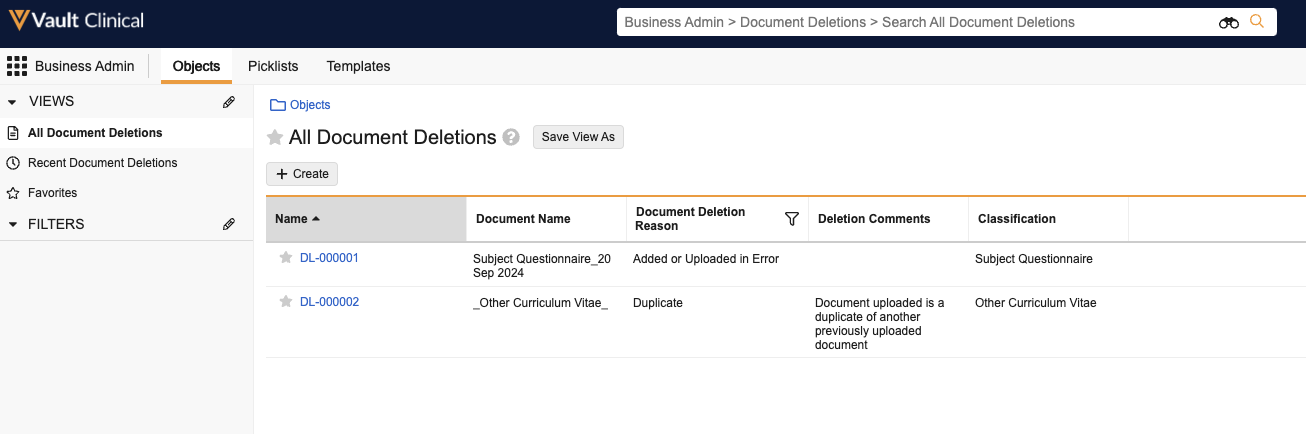
Once enabled, you can view _Document Deletion Log_ records by navigating to **Business Admin > Objects > Document Deletions**.

<a href="https://platform.veevavault.help/assets/images/Document_Deletion_Records_24r3.png" data-lightbox="Document_Deletion_Records_24r3.png" data-title="" data-alt="Document Deletion records">
  <img class="docimage" src="https://platform.veevavault.help/assets/images/Document_Deletion_Records_24r3.png" alt="Document Deletion records" style="max-width: 60%;"  />
</a>

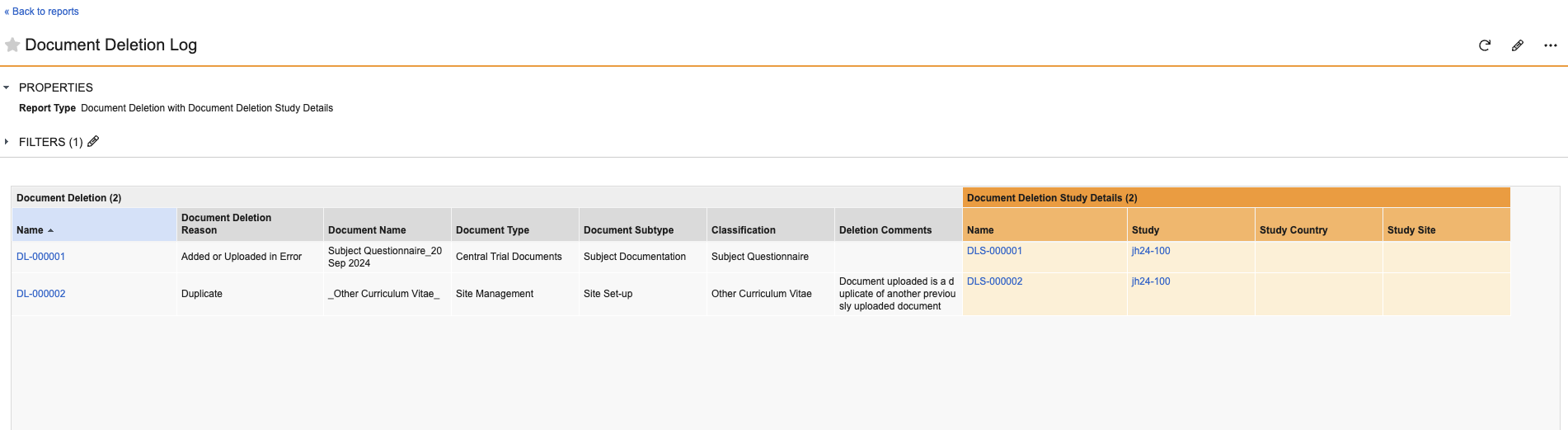
You can also create a <a href="/en/gr/21543/">custom report</a> to report on the _Document Deletion_ object.
<a href="https://platform.veevavault.help/assets/images/Document_Deletion_Log_Report_24r3.png" data-lightbox="Document_Deletion_Log_Report_24r3.png" data-title="" data-alt="Document Deletion report">
  <img class="docimage" src="https://platform.veevavault.help/assets/images/Document_Deletion_Log_Report_24r3.png" alt="Document Deletion report" style="max-width: 50%;"  />
</a>

## Related Permissions

You can view and manage _Document Deletion_ logs with the standard System Admin or Vault Owner security profile. If your Vault uses custom security profiles, your profile must grant the following permissions:

| Type | Permission Label | Controls |
| --- | --- | --- |
| Security Profile | Objects: Document Deletion: Read | Ability to view _Document Deletion_ records. |
| Security Profile | Objects: Related Study, Study Country, Study Site: Read | Ability to view the related _Study_, _Study Country_, and _Study Site_ on a _Document Deletion_ record. | 
