| Metric
|
Definition
|
What drives this result?
|
Suggested Target
|
Example
|
| Extraction Coverage
|
The number of documents that had appropriate information to train the model
|
Documents that fit our extraction criteria (extractable text, English text)
|
50–90%, with the lower end being appropriate for non-English customers
|
A primarily English-based enterprise customer trained a model on 200,000 of their latest documents; their Extraction coverage was 85.34%
|
| Study Metadata Population Coverage
|
The number of documents in whose filename or content a single study was found
|
The documents in your training set and patterns in their naming or content
|
40-60% in sponsor Vaults; possibly lower in CRO Vaults if internal codes are used for study names
|
A customer with a large variety of studies across geographies saw a Study Metadata Population Coverage rate of 44%, whereas a customer with less variety in documentation and vendors saw population coverage of 52%
|
| Study Metadata Population Error Rate
|
The number of documents in whose filename or content a single study was found, and where that study did not match the value on the document
|
The documents in your training set and patterns in their naming or content
|
Your target for this will depend on how risk-averse your organization is. Typically, lower is better, but keep in mind:
- Users can still update metadata that has been set by the TMF Bot
- TMF Bot does this work automatically, saving users time
|
A customer with strong guidelines to include the study number in naming conventions saw a Study Metadata Population Error Rate of 1%, while another with a larger set of studies across geographies saw an error rate of 4%
|
### Using Key Metrics for Evaluation
In the section above, we introduced three Key Metrics to evaluating the effectiveness of your Metadata Extraction model. You can locate them in the Training Summary Results field.
### Extraction Coverage
Extraction coverage is the only Key Metric that you cannot improve. While this might be disconcerting, the purpose of this metric is to set the right expectations for documents added to the Document Inbox. If your company has many audio, video, or other non-text files; a significant number of non-English documents; or regular problems with blurry scans, this metric can help you understand why particular documents are not auto-classified in the Document Inbox.
### Study Metadata Population Coverage
You can improve your Metadata Population Coverage metric via the following methods:
* Review SOPs and/or internal best practices to recommend that the study name be included in the filename of documents.
* Evaluate your Trained Model Performance Metrics for low-performing classifications. If certain classifications have low values for Precision, Recall, or F-1 Score, that will indicate that metadata extraction fails to find matches and/or finds erroneous matches. Creating an _Excluded Classification_ record, in the _Trained Model_, for those document types will exclude them from your testing.
### Study Metadata Population Error Rate
You can improve your Auto-classification Error Rate metric via the following methods:
* Review SOPs and/or internal best practices to recommend that the study name be included in the filename of documents.
* Evaluate your Trained Model Performance Metrics for low-performing classifications. If certain classifications have low values for Precision, Recall, or F-1 Score, that will indicate that metadata extraction fails to find matches or finds erroneous matches. Creating an _Excluded Classification_ record, in the _Trained Model_, for those document types will exclude them from your testing.
### Finishing Evaluation
Once you have evaluated the Key Metrics for your _Trained Model_, you can compare them against our suggested targets and form your own company targets. If your _Trained Model_ meets or exceeds your set target, this would be a good _Trained Model_ to deploy.
## _Trained Model Performance Metrics_
Every Metadata Extraction model has a series of _Performance Metrics_ records once testing has been completed. You can find these in the _Model Performance Metrics_ section of your Metadata Extraction model record. There are two Metric Types for Metadata Extraction Models:
* Global Weighted Average: Contains average _Precision_, _Recall,_ and _F1-Score_ weighted by the number of documents in each classification.
* Classification Performance: Contains the _Precision_, _Recall,_ and _F1-Score_ for the document type listed in the _Metric Subtype_.
* A special OTHERS UNKNOWN _Classification Performance_ record catches the documents with classifications that didn't meet the _Minimum Documents per Document Type_ threshold. These documents are still used in training but are grouped together to better inform predictions on the valid classifications.
Each record shows the following metrics:
* **Precision**: How often the prediction made was accurate

 * **F1-Score**: The balance between _Precision_ and _Recall_
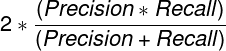 * **Testing Documents**: The number of documents used for testing the model.
* **Correct Predictions**: The total number of times the model correctly predicted the _Study_ name regardless of the prediction confidence.
It is important to note that all predictions marked as correct assume the inputs have metadata that is correct. Any incorrect metadata on documents used to test the model may lead to inaccurate measurements of extraction performance in your Vault. The _Trained Model Artifacts_ listed below can help reveal potential issues.
## _Trained Model Artifacts_
_Trained Models_ have a series of _Trained Model Artifacts_ attached, each containing valuable data. You can find these on a _Trained Model_ object record in the _Trained Model Artifacts_ section. The artifacts include the following files for _Trained Models_ using the Metadata Extraction type:
* **Document Set Extract Results** (`documentset_extract_results.csv`): Extraction results for each document requested for training this model.
* This file is most helpful in seeing why some documents were not used during the training process.
* You can use the _Document ID_ & _Major/Minor Version_ within this file to view the appropriate document within Vault.
* See Reasons for Extraction Failures for a list of potential failure reasons.
* **Testing Documents**: The number of documents used for testing the model.
* **Correct Predictions**: The total number of times the model correctly predicted the _Study_ name regardless of the prediction confidence.
It is important to note that all predictions marked as correct assume the inputs have metadata that is correct. Any incorrect metadata on documents used to test the model may lead to inaccurate measurements of extraction performance in your Vault. The _Trained Model Artifacts_ listed below can help reveal potential issues.
## _Trained Model Artifacts_
_Trained Models_ have a series of _Trained Model Artifacts_ attached, each containing valuable data. You can find these on a _Trained Model_ object record in the _Trained Model Artifacts_ section. The artifacts include the following files for _Trained Models_ using the Metadata Extraction type:
* **Document Set Extract Results** (`documentset_extract_results.csv`): Extraction results for each document requested for training this model.
* This file is most helpful in seeing why some documents were not used during the training process.
* You can use the _Document ID_ & _Major/Minor Version_ within this file to view the appropriate document within Vault.
* See Reasons for Extraction Failures for a list of potential failure reasons.