# Managing Responsibilities

Clinical Operations Vaults use _Responsibility_, _Study Responsibility_, and [_Study Person Responsibility_](/en/lr/61542/#study-person-responsibilities) records to track responsibilities, tasks, and access for Study Personnel across Studies. _Study Person Responsibilities_ control functionality and access for Site Staff in [Site Connect](/en/lr/64231/). _Responsibilities_ determine what is available in <a class="external-link " href="https://quality.veevavault.help/en/lr/48712025#responsibilities" target="_blank" rel="noopener">Study Training<i class="fa fa-external-link" aria-hidden="true"></i></a> for responsibility-based training.

## Configuration Overview
* Add the _Study Responsibilities_ application section to the _Study_ page layout.
* Add the _Study Person Responsibilities_ [_Study Person Responsibilities_ ](/en/lr/61542/#study-person-responsibilities) application section to the _Study Person_ object page layout.
* Save a copy of the standard _Responsibility_ page layout and set it as the default view. This provides an optimized experience when creating _Responsibility_ records.
* Optional: Enable the [_Apply End Date to Study Person Responsibility Records_ job](/en/lr/61542/#end-dates-on-study-person-responsibilities) to manage _End Dates_ on _Study Person Responsibility_ records for _Study Person_ records with an _End Date_.

## Using Responsibilities {#using-responsibilities}

Clinical Operations Vaults include two _Responsibility_ types: _Standard_ and _Specialized_. Veeva manages _Standard Responsibilities_, which represent industry best practices. You can only update the _Exclude from Study Training_ field on _Standard Responsibility_ records. Selecting the _Exclude from Study Training_ field prevents _Responsibility_ records from transferring to Study Training, and Persons with this _Responsibility_ will not be trained on this Responsibility.

<div class="note-border alert-info">
  <div class="alert alert-info" role="alert">
    <div><i class="far fa-info-circle"></i></div>
    <div class="alert-text">
      <p><strong>Note</strong>: While users can update the <em>Important</em> field when editing <em>Responsibility</em> records, this field currently does not affect the record.</p>
    </div>
  </div>
</div>


### Creating Specialized Responsibilities {#specialized-responsibilities}
In addition to _Standard Responsibility_ records, Admins can define and manage _Specialized Responsibilities_. _Specialized Responsibility_ records provide greater flexibility and precision in managing study-specific tasks, responsibilities, and training for Site Staff.

To create a _Specialized Responsibility_:
1. Navigate to **Business Admin > All Responsibilities**.
2. Click **Create.**
3. Enter a **Name**.
4. Select a **Responsibility Category**.
5. Select a **Parent Responsibility**. The _Parent Responsibility_ is limited to _Standard Responsibilities_.
6. In the _Responsibility Type_ field, select **Specialized**. You can only create new _Specialized Responsibility_ records.
7. Optional: Select the **Exclude from Study Training** checkbox. 
8. Click **Save**.

## Creating Study Responsibilities {#study-responsibilities}

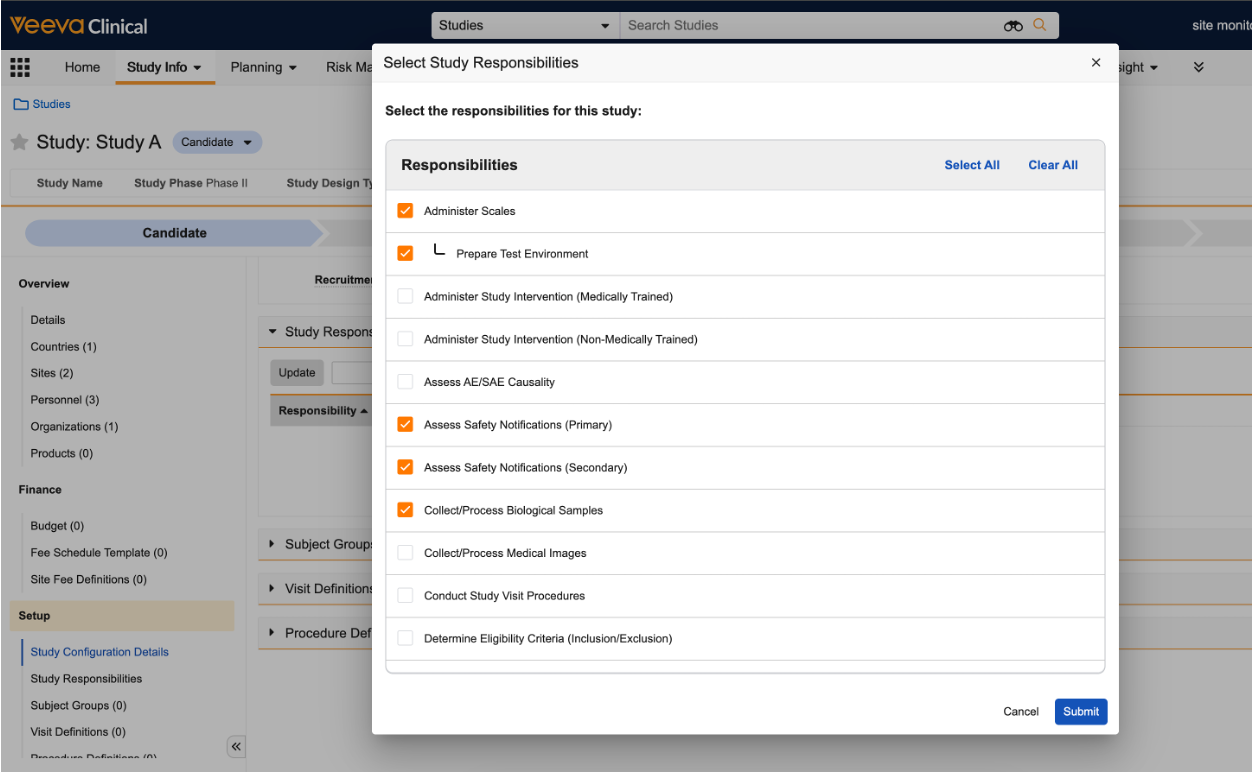
_Study Responsibility_ records link _Responsibilities_ to a specific _Study_. You can create _Study Responsibilities_ through the **Business Admin** tab or the _Study Responsibilities_ application section of _Study_ records. We recommend Admins add the **Study Responsibilities** application section to the _Study_ object layout to benefit from the streamlined Responsibility experience. 

To create a _Study Responsibility_ record:
1. Navigate to the **Study** record.
2. In the _Study Responsibilities_ section, click **Update**. The _Update_ button is only visible if you have _Create_ permissions for _Study Responsibilities_.
3. In the dialog, select the **Responsibilities** you want to add to the _Study_. You must select the parent _Standard Responsibility_ to add a _Specialized Responsibility_.
4. Click **Submit**.

<a href="https://platform.veevavault.help/assets/images/25r1.3-clinops-2-study-person-responsibilities.png" data-lightbox="images" data-title="" data-alt="Study Responsibility Selection Dialog">
  <img class="docimage" src="https://platform.veevavault.help/assets/images/25r1.3-clinops-2-study-person-responsibilities.png" alt="Study Responsibility Selection Dialog" style="max-width: 100%;width: 800px;"  />
</a>

Once you click **Submit**, Vault creates _Study Responsibility_ records for each selected _Responsibility_. To review and manage _Study Responsibility_ records for a _Study_ in bulk, click **Show in Tab** in the _Study Responsibility_ section.

When you deselect a _Responsibility_ in the _Study Responsibilities_ dialog, Vault sets the _Study Responsibility_ record to _Inactive_.

You can use _Study Responsibility_ records to associate _Responsibilities_ with _Study Persons_ by creating [_Study Person Responsibility_](/en/lr/61542/#study-person-responsibilities) records.

## Troubleshooting Errors for _Responsibilities_, _Study Responsibilities_, & _Study Person Responsibilities_

You may encounter constraints when creating and managing _Specialized Responsibilities_. The table below identifies issues and error messages you may see when working with Responsibilities.

| Issue | Error Message |
| ----- | ------------- |
| A user attempted to save a _Specialized Responsibility_ record without a _Parent Responsibility_. | A parent responsibility must be specified. Please update the parent responsibility field and try again. |
| A user attempted to create a _Standard Responsibility_ record. | Cannot create standard responsibility records. Only specialized responsibility records can be created. Please review the responsibility type and try again. |
| A user attempted to delete or inactivate a _Standard_ _Responsibility_ record. | Standard responsibilities cannot be inactivated or deleted. |
| A user attempted to edit a _Standard Responsibility_ record, outside of selecting or deselecting the _Important_ and _Exclude from Study Training_ fields. | For standard responsibilities, only the "Important" and "Exclude from Study Training" fields may be edited. |
| A user attempted to edit the _Responsibility Type_ or _Parent Responsibility_ value on a _Specialized_ type _Responsibility_ record after creation. | Updates to the {`responsibilityTypeLabel`} and/or {`parentResponsibilityLabel`} are not permitted. |
| A user attempted to create a _Study Person Responsibility_ for a _Study Person_ record where the _Person_ is not an _Investigator_ or _Site Staff_. | Responsibilities can only be added for persons of type {`investigatorObjectTypeLabel`} or {`siteStaffObjectTypeLabel`}. Please review the selected person's type or contact your Administrator for assistance. |
| A user attempted to assign both _Assess Safety Notification (Primary)_ and _Assess Safety Notification (Secondary)_ responsibilities to a single _Person_ on a _Study_. | A person can have either Primary or Secondary Assess Safety Notification responsibility, but not both. |

## Related Permissions

You can complete all tasks in this article with the standard Business Admin, System Admin, or Vault Owner profile. If your Vault uses custom security profiles, you must have the following [permissions](/en/lr/22824/) to work with _Responsibilities_, _Study Responsibilities_, and _Study Person Responsibilities_.

| Permission Type | Permission | Controls |
| --------------- | ---------- | --------- |
| Security Profile  | Object: Responsibilities: Read, Create, Edit, Delete | Allows you to to read, create, update, and delete _Responsibility_ records |
| Security Profile  | Admin: Business Admin Objects: View | Allows you to view the _Business Admin_ tab. _Business Admin_ access is needed for managing _Responsibility_ records. |
| Security Profile | Object: Study Responsibilities: Read, Create, Edit, Delete | Allows you to read, create, update, and delete _Study Responsibility_ records |
| Security Profile | Object: Study Person Responsibilities: Read, Create, Edit, Delete | Allows you to read, create, update, and delete _Study Person Responsibility_ records |
| Security Profile | Object: Study: Object Control Permissions: View | Allows you to view the _Study Responsibility_ application control |
| Security Profile | Object: Study Person: Object Control Permissions: View | Allows you to view the _Study Person Responsibility_ application control |
