The RIM-Medical Connection is a standard Veeva Connection that enables organizations with both RIM and Medical Vaults to increase data quality when managing medical content and medical inquiries.
Note: The RIM-Medical Connection must be configured by a Vault Admin.
About the RIM-Medical Connection
The RIM-Medical Connection currently includes the following features:
- Document Exchange eliminates manual document transfer between RIM and Medical Vaults by automating CrossLink document creation in Medical upon approval in RIM.
- Product Data Transfer automatically aligns product data between the RIM and Medical application families, transferring product, indications, and local product data between Vaults to facilitate common terminology across teams.
Prerequisites & Dependencies
Document Exchange requires the following Vault applications:
- RIM: Submissions
- Medical: MedComms or MedInquiry
To take full advantage of the Product Data Transfer feature, your organization must have a Medical Vault enabled with any applications, and a RIM Vault enabled with both the Submissions and Registrations applications. When RIM Registrations is not enabled, Medical users must manually populate some details.
Related Articles & Resources
The RIM-Medical Connection is one of many Veeva-provided standard connections that support and automate business processes between separate Vaults. See About Veeva Connections for general information about how a connection can work for your organization.
We also recommend visiting a Veeva Connect community to learn about best practices and interact with the Veeva Vault Product Team:
- RIM: Submissions, Publishing and Archive or Registrations
- Medical: MedComms or MedInquiry
How Document Exchange Works
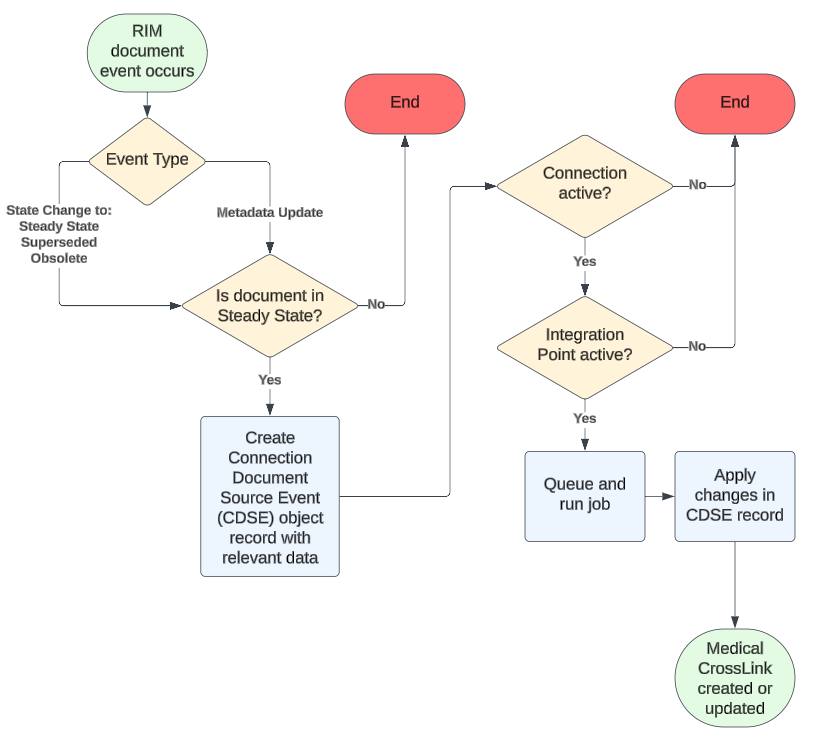
The RIM-Medical Connection’s Document Exchange feature supports the one-way transfer of Steady-state RIM source documents to the target Medical Vault as CrossLinks.
With some limitations, Document Exchange creates and maintains Medical CrossLink documents when a RIM document:
- Enters the Steady state for the first time.
- Undergoes a metadata update while in the Steady state.
- Re-enters the Steady state after revision.
- Enters the Superseded or Obsolete state.
To do this, Vault stores the RIM document event details within a Connection Document Source Event record, then applies those changes in the Medical Vault.
How Product Data Transfer Works
The RIM-Medical Connection’s Product Data Transfer feature synchronizes product, indications, and local product data between RIM and Medical Vaults to facilitate common terminology across teams.
To do this, the connection references the RIM and Medical records’ External ID (external_id__v) to check for duplicates, then creates or updates the record in the target Vault. This ensures any Medical records populated from an external system are not duplicated.
| RIM Object | Medical Object | Considerations |
|---|---|---|
| Product Family | Product Family | |
| Product | Product Form | |
| Product Variant | Product Variant | |
| Packaging | Packaging | |
| Packaging Product Variant | Packaging Product Variant | Records are used for drug or multiform products only. |
| Regulatory Text | Local Product | |
| Product Regulatory Text | Product Family Local Product | Due to underlying records in both Vaults, Medical Product Family Local Products may have duplicate values. This is expected and does not impact Medical functionality. |
| Therapeutic Indication | Indication | |
| Registered Regulatory Text | Local Product Country | RIM Vault must have Registrations. In Medical, records are created for each unique country where the local product is registered. |
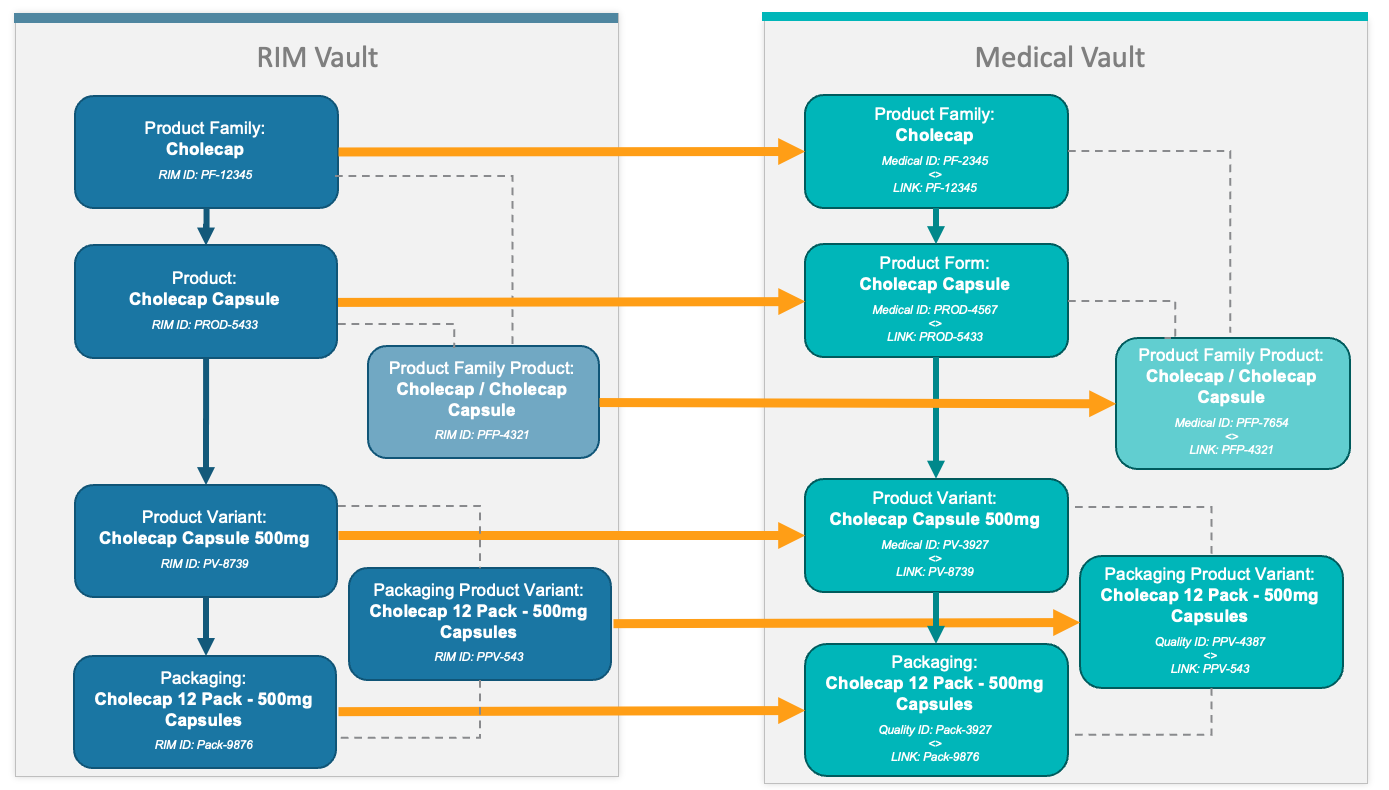
Product Hierarchy Transfer
The diagram below illustrates the various RIM and Medical object records the connection transfers for a simple drug product.
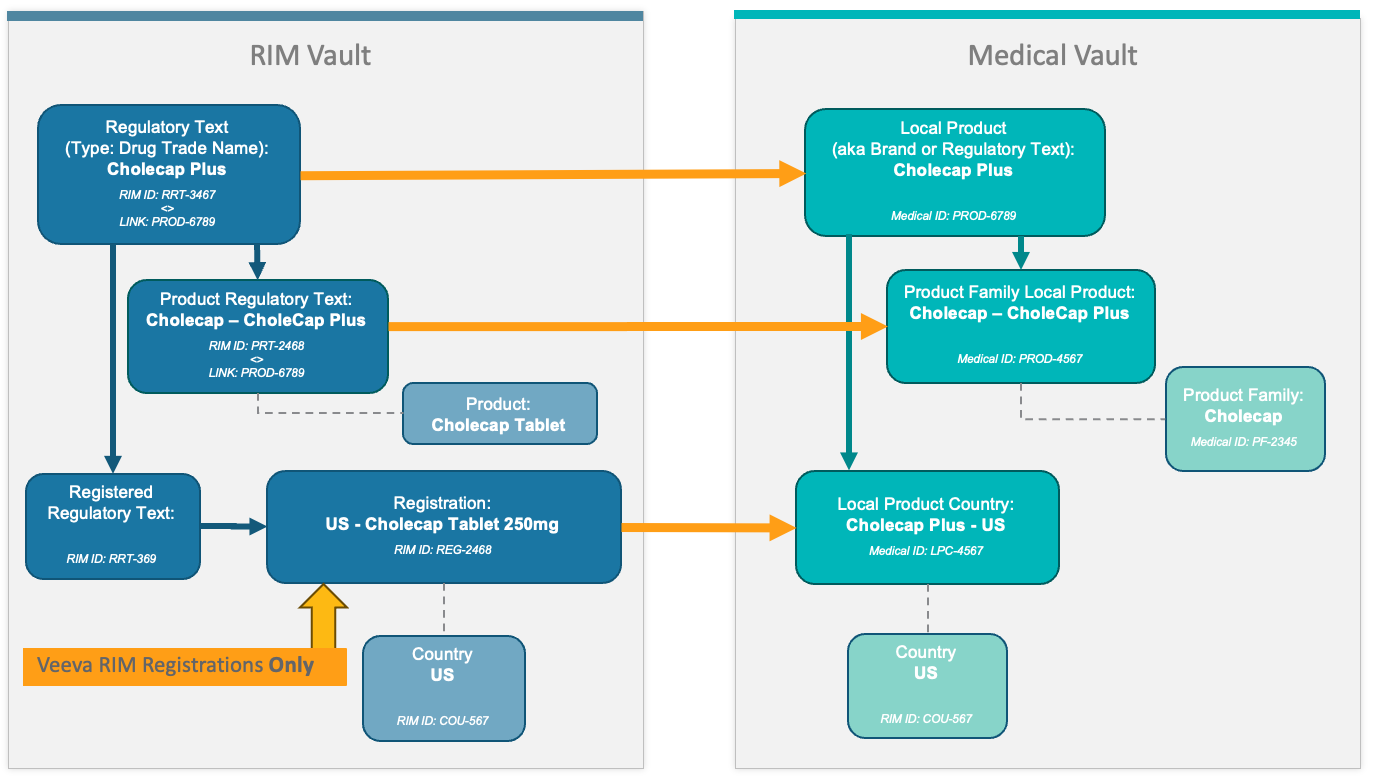
Local Product Transfer
The diagram below illustrates the various RIM and Medical object records the connection transfers for a simple drug product.
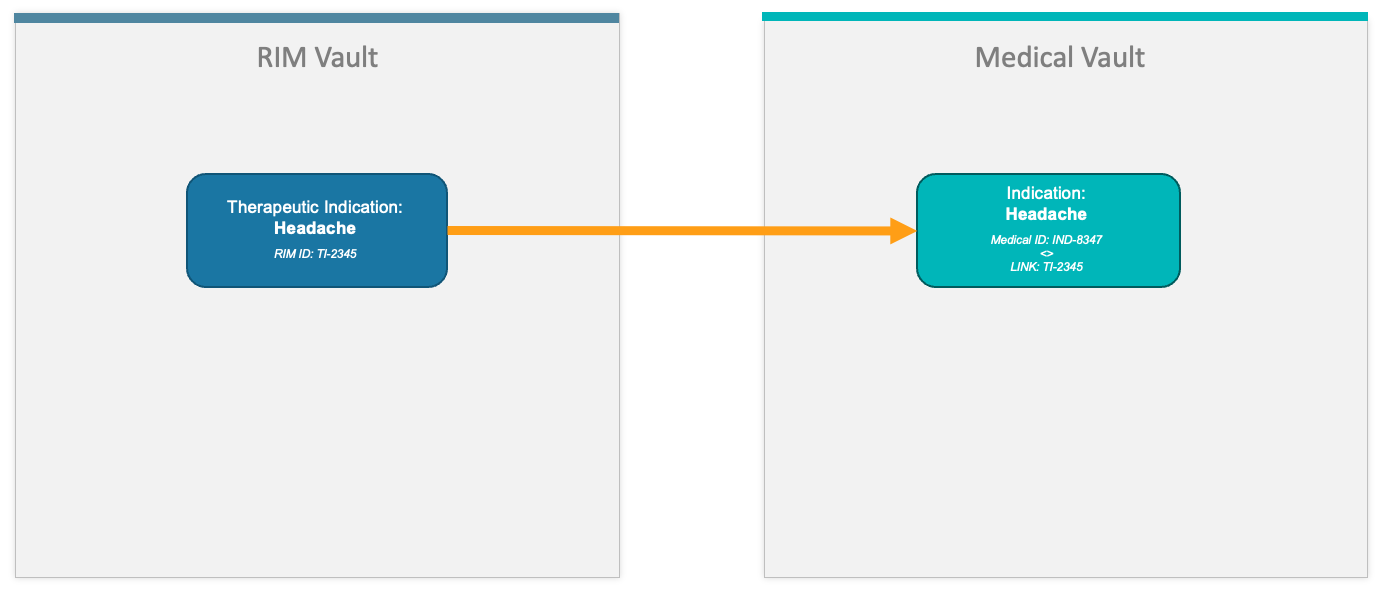
Therapeutic Indication Transfer
The diagram below illustrates Therapeutic Indication transfer from RIM to Medical.
Limitations
Document Exchange Limitations
- This feature only supports the one-way transfer of Steady-state RIM source documents to the target Medical Vault. It does not support transferring documents from Medical to RIM.
- Upon Document Exchange enablement, the connection only initiates document transfer once the source document reaches its next Steady state. For example, if RIM document v2.0 is updated to Steady state v3.0, only v3.0 is transferred to Medical. The Medical CrossLink version history begins at v3.0, and any subsequent Steady state versions (4.0 and later) are properly reflected.
- Similarly, Document Exchange does not create target Medical CrossLinks for source RIM documents created in the Steady state. A source document must exit a given state (for example, Draft), then enter the Steady state in order for Vault to create a target CrossLink.
- The RIM-Medical Connection does not support CrossLinks of CrossLinks. This can occur in Vaults which also use the RIM-PromoMats and PromoMats-Medical connections for label management. For example, if a label document were to go from RIM to Medical to PromoMats, then back to RIM for the Compliance Package, RIM would not be able to identify the label document. This is because the document’s Source Document Details fields would be referencing the Medical CrossLink, not the RIM CrossLink. As a result, RIM cannot match the source document or create a reference leaf.
Product Data Transfer Limitations
This feature only creates target Local Product Country records in Medical when the source Vault includes RIM Registrations. This is because Registrations users generate the Registered Regulatory Text records necessary to populate Local Product Country. As a result, Medical users must manually populate Local Product Country records when Registrations is not in use in the RIM Vault.