Organizations using both a RIM Vault and a Clinical Operations Vault on the same domain can use a standard Vault to Vault connection. When configured, the RIM-Clinical Operations connection transfers Product Family, Clinical Study, and Clinical Site records, as well as regulatory data, across Vaults. The connection also and automates the creation, versioning, and updating of CrossLink documents and fields. Streamlining object record and document creation reduces duplicate data and allows Vault documents to have a single source of truth within an organization.
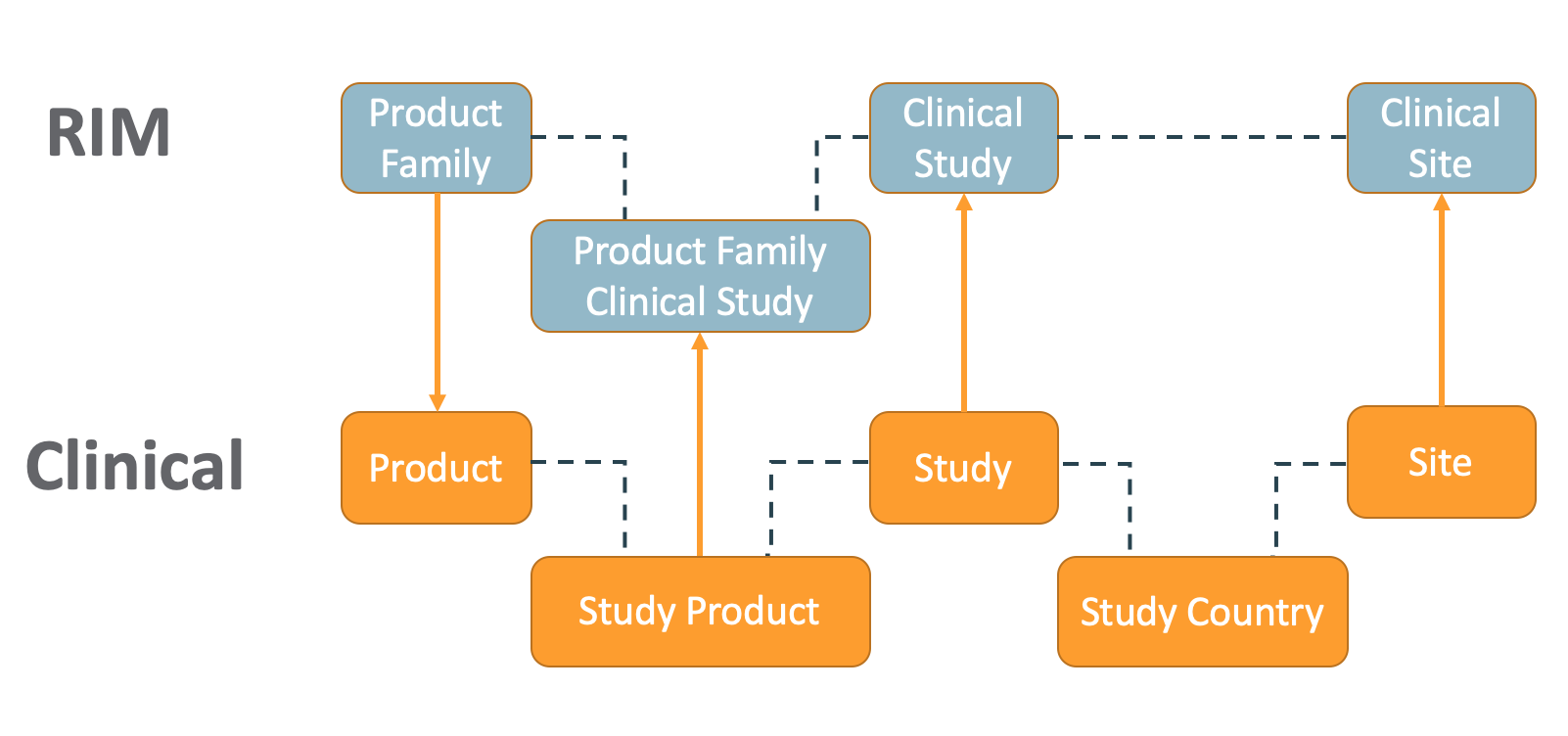
How the RIM-Clinical Operations Connection Works
The RIM-Clinical Operations Connection creates new records, updates existing records, and creates CrossLink documents across Vaults in the below situations.
Object Records
- When a user creates or edits a Product Family record in the RIM Vault, Vault creates or updates the Product record in the Clinical Operations Vault.
- When a user creates or edits a Study record in the Clinical Operations Vault, Vault creates or updates the Clinical Study record in the RIM Vault.
- If the Study Type, Study Subtype, or Type of Control fields are populated on the Study record, Vault updates the Clinical Study record with the appropriate mapped fields in RIM.
- When a user creates or edits a Study Product record in the Clinical Operations Vault, Vault creates or updates the Product Family Clinical Study record in RIM.
- When a user creates or edits a Site record in the Clinical Operations Vault, Vault creates or updates a Clinical Site record under the same Clinical Study record in RIM and populates the Site Country field based on Study Country in the Clinical Operations Vault.
- When a user creates or edits a Regulatory Objective or Country Decision Detail record related to a clinical trial approval Application in RIM, Vault updates a corresponding milestone record in Clinical Operations.
CrossLink Documents & Fields
- When a document enters its Steady state in the source Vault, Vault creates or versions a CrossLink document in the target Vault and populates fields. An Admin defines CrossLink document behavior in the connection’s configuration. See details about document creation below.
- Study field behavior for CrossLinks created in Clinical Operations from RIM:
- When a RIM source document has a valid Clinical Study field value (according to the Clinical Operations Study), the connection populates it accordingly. If the Study does not exist in Clinical Operations, the connection generates a User Exception Message.
- When a RIM source document has a blank Clinical Study field value, Vault populates the Clinical Operations Study field based on the Active Lead Agent Product associated with the Product Families on the RIM document. In order to leverage this defaulting behavior, Study records in Clinical Operations must use the Lead Agent Study Product Role record.
- When a RIM document to be CrossLinked has a valid Site value (according to the Clinical Operations Site), the connection populates it accordingly. If the Site does not exist in Clinical Operations, the connection generates a User Exception Message.
- By default, when the Clinical source document does not include a Product value, Vault defaults Products on the RIM CrossLink based on the Product Family Clinical Study relationship for every Study referenced by the source document. Contact Veeva Support to enable an optional setting by which Vault instead defaults Products on the RIM CrossLink based on the Primary Product Family assigned to the Study referenced by the source document.
- When the RIM document to be CrossLinked has a “European Union” value in the Country field, Vault populates all relevant study countries (where the Country belongs to the “European Union” Jurisdiction) on the Clinical CrossLink.
- The Jurisdiction Country object must be configured in order to utilize this mapping logic. Contact Veeva Support for the recommended mappings.
- In order for Vault to populate a Clinical CrossLink’s Study Country field via the jurisdiction and country mapping logic, a RIM country value which is considered a Clinical Jurisdiction cannot be included in Clinical’s Country object. In the European Union example, this means the RIM Vault’s European Union country cannot be both a Country and a Jurisdiction in Clinical.
- If the RIM source document includes a Study that is archived in Clinical, then the Study is removed from the CrossLink before creation or update.
- All Products on the Clinical CrossLink document must be a Study Product for at least one Study on the document. If this is not true, then a user exception message is created and the CrossLink fails to create or update.
Additional Considerations
- When a new Study Product record is created in Clinical Operations, the connection does not automatically reprocess any CrossLinks to add additional Studies to documents.
- When users delete documents or object records in one Vault, Vault does not delete the associated documents or object records in the connected Vault.
How Submission Tracking Works
When configured, the Submission Tracking integration automatically sends relevant regulatory tracking information about initial clinical trial approvals from source RIM objects (Regulatory Objectives, Submissions, Country Decision Details) to target Clinical Operations Milestones, based on the milestone’s Milestone Type and the related Study. This automatic transfer prevents double-entry and ensures data integrity for initial global clinical trial approvals such as US INDs, Canadian CTAs, and EU CTR.
Submission Tracking’s capabilities can be understood by the Clinical Operations Vault’s various inbound Integration Points, shown in the table below. The source RIM data is based on Regulatory Objective records, and the connection transfers data to Clinical Operations when a Regulatory Objective associated with a clinical trial approval-related application is updated or created in RIM.
| Clinical Operations Inbound Integration Point | Clinical Milestone Type |
|---|---|
| RIM-Clinical: Clinical Trial Submission | HA Application |
| RIM-Clinical: Clinical Trial Approval | HA Approval |
| RIM-Clinical: EU CTR Part I | EU CTR Part I Application |
| RIM-Clinical: EU CTR Part II | EU CTR Part II Application |
| RIM-Clinical: EU CTR Final Approval | EU CTR Country Approval |
Connection Triggers
The following RIM events trigger the connection:
- A Regulatory Objective related to a Clinical Study and an Application with one of the below Application Types is created or updated.
- Clinical Investigation Application
- Clinical Trial Authorisation (CTA)
- Clinical Trial Certificate Application
- Clinical Trial Dossier
- Clinical Trial of Investigational Medicinal Products (CTIMP)
- Clinical Trials
- Investigational New Drug (IND)
- Investigational New Drug (IND)
- Clinical Trial Application (CTA)
- Clinical Trial Notification (CTN)
- Global Clinical Trial
- Investigational Device Approval
- Investigational New Drug
- 临床试验申请 (Investigational New Drug)
- A Submission related to a Regulatory Objective that meets the first criteria above is created or updated.
- A Regulatory Objective’s related Country Decision Detail that meets the first criteria above is created or updated.
To do this, the connection references RIM’s Regulatory Objective-Clinical Study relationship to locate:
- The relevant Clinical Operations Study to populate, via the Clinical Study’s Link field in RIM.
- The relevant Study Countries to populate in Clinical Operations, based on the Regulatory Objective’s related Country Decision Details in RIM.
Milestone Mapping Logic
The connection maps data across Vaults via Clinical Operations reference lookups for the country__v object and submission_decision__v picklist:
- The
country__vlookup maps each RIM Country record’s Veeva RIM UUID (source key) to the target Clinical record. - The
submission_decision__vlookup maps RIM Submission Verdicts to the Submission Decision value for Clinical Milestones.
| RIM: Submission Verdict | Clinical: Milestone Submission Decision | Connection Action |
|---|---|---|
| Approved | Approved (approved__v) |
Populates the Milestone’s actual_finish_date__v based on the mapped RIM Country Decision Detail date fields. |
| Approved with Conditions | Approved with Conditions | Populates the Milestone’s actual_finish_date__v based on the mapped RIM Country Decision Detail date fields. |
| Rejected | Rejected (rejected__v) |
Populates the Milestone’s actual_finish_date__v based on the mapped RIM Country Decision Detail date fields. |
| Study May Proceed | Approved | Populates the Milestone’s actual_finish_date__v with the RIM submission_decision_date__v |
| Withdrawn | Withdrawn | Clears the Milestone’s actual_finish_date__v |
Procedure-Specific Automation
The connection synchronizes data differently depending on whether a trial follows an EU or non-EU regulatory pathway.
For non-EU procedures such as US IND and Canadian CTA, the RIM Regulatory Objective lifecycle includes an entry action to update the lifecycle state of all related Country Decision Details to Withdrawn or Study May Proceed. Then, the connection populates Milestones for the HA Application and HA Approval types.
For EU CTR procedures:
- For country-specific updates, RIM users manually set the Submission Verdict on a specific country’s Country Decision Detail record as local decisions are made. Then, the connection populates Clinical Milestones for that specific country.
- For global updates, once the global regulatory process is final (for example, the application is withdrawn), RIM users move the main Regulatory Objective to a final state (for example, Withdrawn). This state change includes an entry action that updates all remaining Country Decision Details to that same state. Then, the connection populates the final status to all relevant Clinical Milestones across all participating countries.
Record Linking & Unlinking
Vault establishes the relationship between source and target records by populating the corresponding Clinical Operations Milestone’s Link field with the relevant Country Decision Detail (CDD) record’s Global ID, ignoring any milestones in the Complete state during this process.
The connection continually references this field along with Study and Milestone lifecycle states to determine whether to update it based on new and updated RIM records. When a trial requires a resubmission and a new Regulatory Objective is created for an initial application, the connection automatically re-uses and populates existing Clinical Operations study and country milestones.
When a RIM CDD record is marked as inactive, the connection automatically handles the corresponding Milestone based on the study’s status:
- When a Study is in the Archived state or a Milestone is Complete or Inactive, Clinical Operations retains existing record data but clears the milestone’s Link field to ensure the connection no longer updates it.
- When a Study is still active and the Milestone is not Complete or Inactive, the connection clears all mapped fields along with the Link field.
Common User Exception Items
The below conditions cause the connection to generate User Exception Messages with related User Exception Items:
- Invalid Study Link: The RIM Regulatory Objective’s Clinical Study does not resolve to an active Clinical Operations Study via the RIM record’s Link field.
- Missing Study Milestone: Clinical’s Milestone does not exist for the overall study.
- Missing Study Country: Clinical’s Study Country does not exist for every Country Decision Detail related to the RIM Regulatory Objective.
- Missing Country Milestone: Clinical’s Milestone for the specific Study Country does not exist.
- Existing Link Conflict: A study-level or country-level milestone already has a populated Link field value, and the milestone is not in a completed or inactive state.
- In Migration lock: The target Clinical Operations study is In Migration, temporarily blocking updates.
- Record in candidate state: The Clinical study or country is in the initial Candidate state, meaning its required Milestones have not yet been generated.
- Concurrent Duplicate Records: Multiple Regulatory Objectives or Country Decision Details are created or updated within the same job and attempt to populate the exact same Clinical Milestone.
- Milestone configuration gap (EU only): The Clinical Vault is not configured to use the standard EU CTR Country Approval milestone (via the RIM-Clinical: EU CTR Final Approval integration point), preventing the connection from locating a target.
About Record Creation & Update
When creating a record through the connection, Vault also populates the Link (link__sys) field on the target record with the source record’s Global ID (global_id__sys). These fields let Vault know which records to update in the target Vault when data is updated in the source Vault.
About Document Creation & Update
Vault creates new CrossLink documents in the steady state defined in the target Vault’s document lifecycle of a given document type. If the document’s type has multiple lifecycles, Vault applies the first lifecycle available. The connection creates CrossLink documents using the Specific Document Version binding rule. See details about source binding rules below.
The RIM-Clinical Operations Connection creates, up-versions and syncs metadata for documents in the target Vault that are configured to transfer between Vault applications:
- When a source document enters its Steady state, the Connection creates a CrossLink in the target Vault in the Steady state of the target’s Document Type defined on the Document Lifecycle. Vault also applies any entry actions configured on that lifecycle state, for example, setting the version number to a major version.
- If a Connection-created CrossLink exists on the target Vault and a new version of the source document is created and moved to a steady state, the Connection up-versions the Target CrossLink and creates a new CrossLink version.
- When the fields on a Steady state source document are modified in the source Vault, Vault updates those fields on the CrossLink document in the target Vault.
- If the connection has never run, Vault only transfers the latest Steady state version of the document.
- Document versions created in the target Vault are set by the target Vault and bound to the versions from which they were created in the source Vault.
- The Documents Integration is triggered when (1) a source document in-scope for transfer enters the Steady State and (2) a source document that has a Connection-created CrossLink has a metadata update. Updates on an Approved source document that does not have a Connection-created CrossLink does not trigger the Connection.
Note: Vault does not apply document reuse functionality to CrossLink documents in Clinical Operations Vaults that were transferred from RIM Vaults.
About Source Binding Rules
If a CrossLink document does not already exist in the target Vault, Vault creates the CrossLink document and binds it to the current document version in the source Vault. Vault will then update the CrossLink document only if a user in the source Vault specifically edits the version of the source document that is bound.
All CrossLink documents created via the RIM-Clinical Operations Connection have the Source Binding Rule set to Specific Document Version.
About Connection Stats
By default, the RIM-Clinical Operations Connection record includes a Connection Stats section that displays daily performance metrics for the connection, including the number of Spark messages sent or received and the number of failures, retries, timeouts, and fatal errors.
When configured in your RIM Vault’s Connection and Connection Stats object page layouts, you can view additional RIM-specific stats provided by Veeva, for example the number of CrossLink versions created in RIM per day via the Connection Stats object’s Crosslink Versions Created field.
See additional details about leveraging the Connection and Connection Stats objects in a connected Vault.